Search for the best AI project manager and you will find six different products selling six different jobs under one label.
One repairs your calendar. One builds approval workflows. One searches a company workspace. One turns notes into databases. One coordinates software delivery. One sits beside the project and asks, “What is actually putting this plan at risk?”
Those jobs overlap, but they are not interchangeable. The best tool depends on where your projects usually fail.
This comparison covers TaskCoach Space AI, Motion, Asana AI Studio, ClickUp Brain, Notion AI, and Jira with Rovo. We used current official product material for every competitor and tested TaskCoach against a realistic 20-task product launch. Product images were verified against official first-party pages on July 21, 2026.
The short answer: which AI project manager is best?
TaskCoach Space AI is our overall pick for an individual operator, founder, or small team that wants AI to think through the project and keep the human in control. It reviews project health, finds missing work, prioritizes tasks, builds schedules, organizes hierarchy, applies planning frameworks, answers grounded questions, and presents edits for approval.
The other winners are clear once the job changes:
| Best for | Pick | Why it wins |
|---|---|---|
| Project coaching and reviewable planning | TaskCoach Space AI | Connects diagnosis, priorities, missing work, schedule, and structured edits |
| Automatic scheduling and capacity | Motion | Replans work around deadlines, dependencies, calendars, and workload |
| Repeatable operations workflows | Asana AI Studio | Builds no-code flows for intake, routing, approvals, and reporting |
| Wide workspace context | ClickUp Brain | Works across tasks, Docs, Chat, wikis, memory, and agents |
| Knowledge-first projects | Notion AI | Converts notes and research into databases, roadmaps, and recurring agent work |
| Software delivery at scale | Jira with Rovo | Adds agents, work breakdown, readiness checks, and governed context |
The winner changes with the system you run and the friction you want to remove.
How we compared the tools
Feature counts are a poor way to judge AI project management. We used six practical questions instead:
- Can it understand project state? The tool should connect status, dates, ownership, scope, dependencies, and risk.
- Can it improve the plan? Useful AI should find gaps, create structure, or recommend a better sequence.
- Can it adapt execution? This includes scheduling, capacity, routing, triggers, and change response.
- Does it use the right context? More context can help, provided the system can separate signal from workspace clutter.
- Can a person inspect and control the result? High-impact edits need evidence, previews, permissions, or approval steps.
- How much system maintenance does it demand? A powerful agent that needs perfect data may create more work than it removes.
The scorecard below is qualitative. “Focused” means the capability is central to the product. “Available” means the tool supports it, though another product makes it a clearer strength.
| Tool | Plan diagnosis | Auto scheduling | Workflow automation | Context reach | Change control | Setup load |
|---|---|---|---|---|---|---|
| TaskCoach | Focused | Guided | Limited | One Space | Review-first | Low |
| Motion | Schedule risk | Focused | Strong | Work and calendars | Medium | Medium |
| Asana | Strong | Available | Focused | Projects and portfolios | Strong | Medium to high |
| ClickUp | Strong | Available | Focused | Very broad | Medium | High |
| Notion | Flexible | Limited | Strong | Knowledge-rich | Medium | Medium |
| Jira + Rovo | Strong for delivery | Available | Focused | Org and dev context | Strong | High |
1. TaskCoach Space AI: best for project coaching and control
TaskCoach has the narrowest and most useful definition of an AI project manager in this group: inspect one Space, tell the user what matters, and propose changes that can be reviewed before they touch the plan.
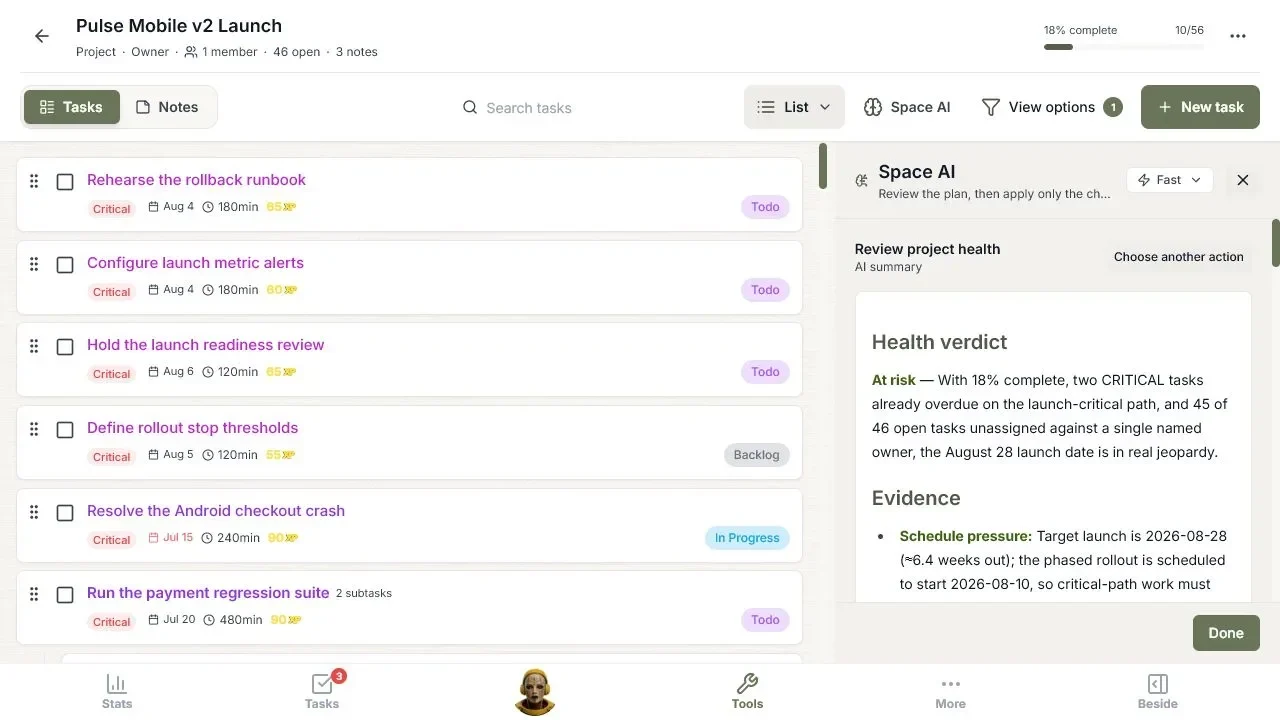
We tested it on Pulse Mobile v2 Launch, a realistic product launch with 20 tasks. Seventeen remained open, two were overdue, 16 open tasks had no owner, and most work lacked estimates or a useful hierarchy.
The health review marked the launch at risk and cited the evidence. Gap analysis proposed missing launch controls such as alerting, rollback, readiness gates, and rollout thresholds. Other actions prioritized the backlog, organized parent and child tasks, built a schedule, and drafted a stakeholder update. You can see the full test in our AI project management example.
Where TaskCoach is strongest
- The AI acts like a coach across several planning jobs instead of waiting for a perfect prompt.
- Results point back to task and project evidence.
- Proposed task edits stay selectable and reviewable.
- The workspace stays lighter than an enterprise operations suite.
- Multiple views, frameworks, notes, and Space-level context support the same plan.
Where TaskCoach is weaker
TaskCoach does not yet have Motion’s continuous calendar repair, Asana’s mature event-driven workflow builder, or Jira’s organization-wide software graph. Team capacity history, automated triggers, and dependency-aware replanning are the clearest gaps.
Choose TaskCoach when: your project is messy, the next decision is unclear, and you want AI judgment without handing the plan to an opaque automation layer.
2. Motion: best for automatic scheduling and capacity
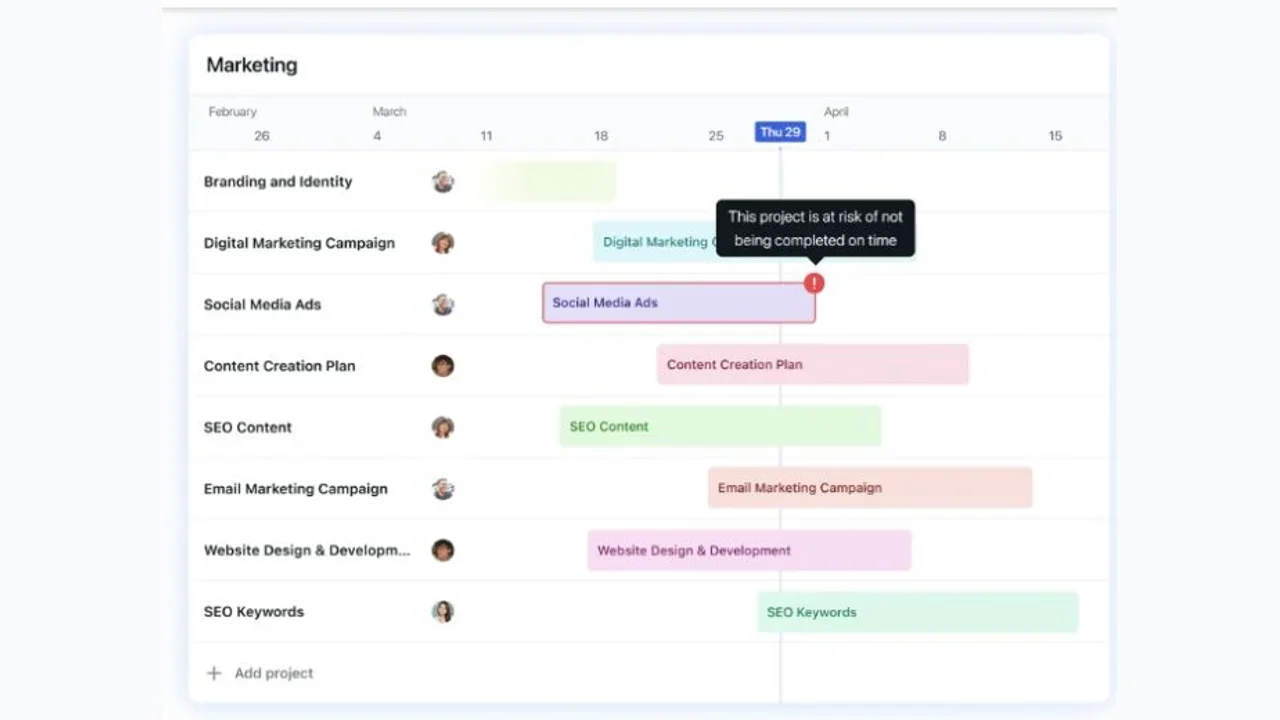
Motion is the strongest choice when the project plan and the calendar need to behave as one system. Its AI project manager centers on dependencies, team capacity, deadlines, workload, and continuous reprioritization.
The signature experience is active schedule repair. When blocking work finishes late or a deadline moves, Motion can adjust the plan and surface when a project is at risk of missing its target. That closes the gap between a project board and the hours people can actually work.
Where Motion is strongest
- Calendar capacity is part of the planning model.
- Dependencies and deadlines can drive schedule changes.
- Workload balancing is closer to execution than a static priority field.
- Deadline risk appears before the final week.
Where Motion is weaker
Motion needs credible duration, availability, and dependency data. Teams that resist calendar planning may fight the system. It also puts more product emphasis on schedule optimization than on an explainable project audit, plan-gap coaching, or a review queue of structured changes.
Choose Motion when: your task list is reasonable, but changing meetings, workload, and deadlines repeatedly break the weekly plan.
3. Asana AI Studio: best for repeatable operations
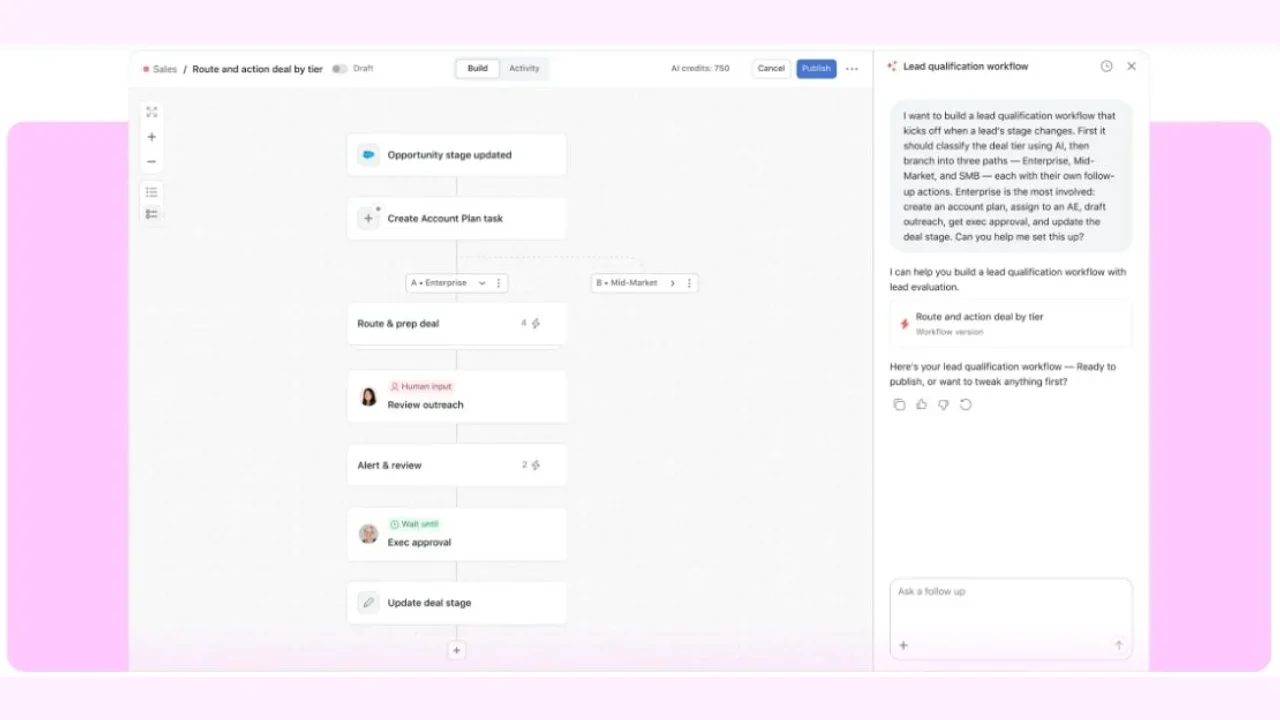
Asana AI Studio is closer to a no-code operations designer than a single project chatbot. Teams can build workflows that inspect incoming work, classify it, route it, create outputs, wait for human input, and continue through approvals.
That makes it especially good for processes such as campaign intake, creative requests, lead qualification, launch approvals, and recurring status reporting. Once a team agrees on the rules, AI Studio can run the same judgment step at the right point in every request.
Where Asana is strongest
- Workflow steps are visible and reusable.
- AI can classify, route, research, report, and create inside an established process.
- Human review fits naturally into the flow.
- Asana’s existing portfolio and work data give the workflow useful structure.
Where Asana is weaker
Someone has to design the operating model. That investment pays off for recurring work, but it is heavy for a founder trying to untangle one rough project this afternoon. AI Studio is also less opinionated about coaching the whole project unless the team has encoded that review into a workflow.
Choose Asana when: the organization already has repeatable intake, routing, approval, or reporting work and wants AI to run those steps consistently.
4. ClickUp Brain: best for an all-in-one workspace
ClickUp Brain reaches across tasks, Docs, Chat, wikis, connected apps, persistent memory, and agents. Its value grows when a team already keeps a large share of its operating context in ClickUp.
ClickUp's official task view shows Brain working inside a selected workspace location instead of as a separate chatbot. It can answer questions about overdue or high-priority tasks, generate project updates, find stuck work, and pull context from connected apps and other workspace locations.
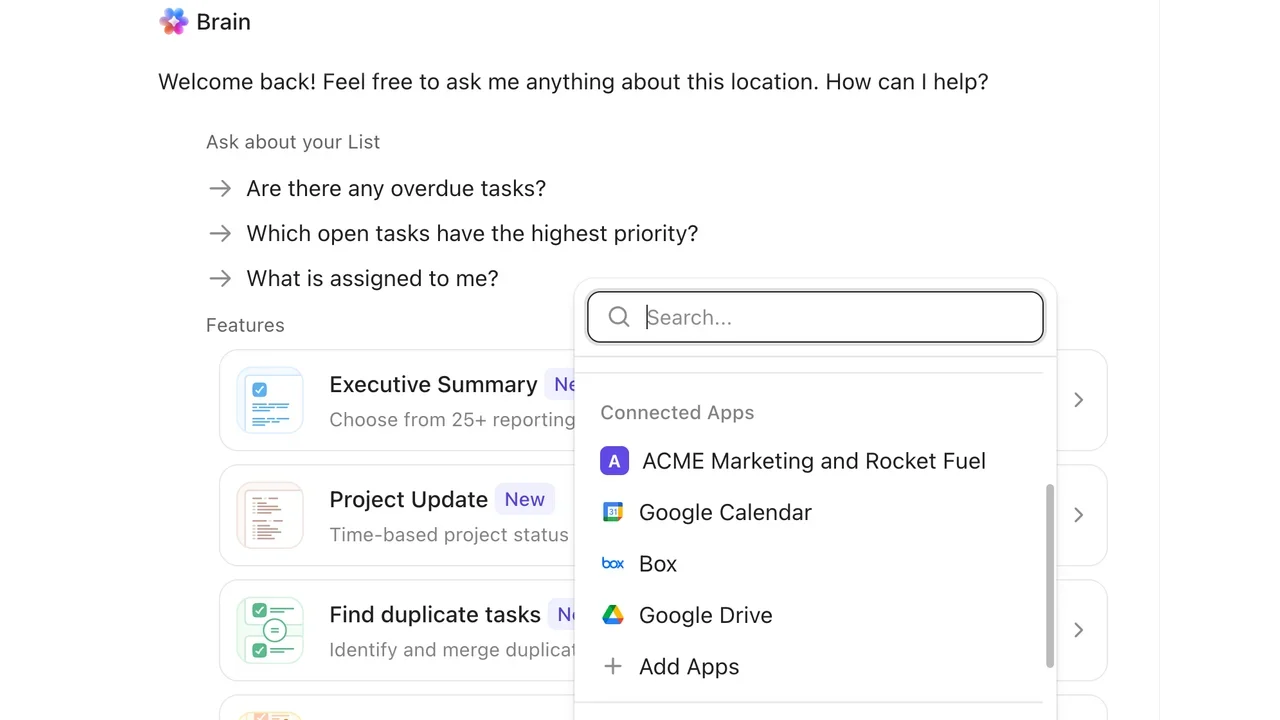
Official ClickUp Help interface captured July 21, 2026.
Where ClickUp is strongest
- One AI layer can see several work surfaces.
- Agents and memory support recurring behavior.
- Task creation, summaries, progress updates, and workspace search sit close together.
- Teams can consolidate tools around one data model.
Where ClickUp is weaker
Breadth creates its own tax. A large ClickUp workspace can be dense, and AI cannot repair inconsistent statuses, duplicate Docs, unclear ownership, or abandoned lists by itself. Teams need conventions and governance to get the most from the context layer.
Choose ClickUp when: your main problem is fragmented project context and you are willing to run tasks, docs, conversations, and automations in one broad system.
5. Notion AI: best for knowledge-first projects
Notion is strongest when the project begins as research, meeting notes, a brief, a brainstorm, or a messy collection of pages. Notion Agent can build and edit workspace content, while AI database features extract summaries, tags, owners, and other structured fields.
Notion's official task-triage demo makes the advantage concrete. A custom Agent catches a reported form bug, moves it into a shared bug tracker, and posts confirmation back to the team. That is the useful version of AI in Notion: knowledge becomes structured work without leaving the workspace.
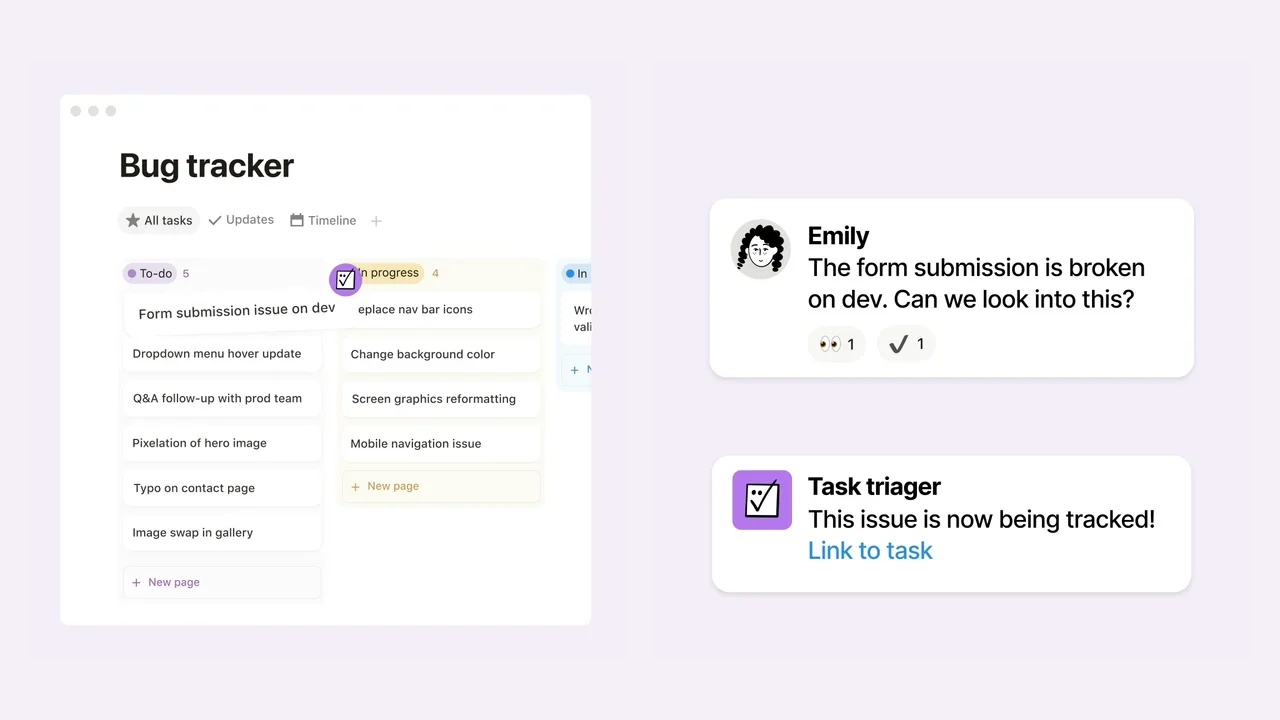
Official Notion Agent product demo captured July 21, 2026.
Where Notion is strongest
- Unstructured knowledge can become structured work quickly.
- Docs, databases, search, and agents share one flexible canvas.
- Custom Agents can run repeatable knowledge workflows.
- Teams can shape the project model around their own language.
Where Notion is weaker
Flexibility means the team must choose how projects should work. Native capacity planning, critical-path behavior, and schedule repair are less central than they are in dedicated project systems. A beautiful database can still hide weak ownership or an unrealistic delivery plan.
Choose Notion when: the project’s source material matters as much as the task board and your team wants AI to turn knowledge into structure.
6. Jira with Rovo: best for governed software delivery
Jira with Rovo is the strongest enterprise and software option in this comparison. Rovo can use Atlassian’s Teamwork Graph, search connected knowledge, chat about work, and assign tasks to agents. Jira adds work breakdown, readiness checks, status drafting, automation, permissions, and deep software delivery context.
The Work Readiness Checker is a particularly practical idea. It checks whether work is clear and complete before the team commits. Rovo can also break a large item into manageable work, create items from Slack, Confluence, email, an IDE, or images, and explain blockers or recent updates. Atlassian's own Jira AI example shows this directly by turning a loose issue description into an objective, benefits, acceptance criteria, and definition of done.
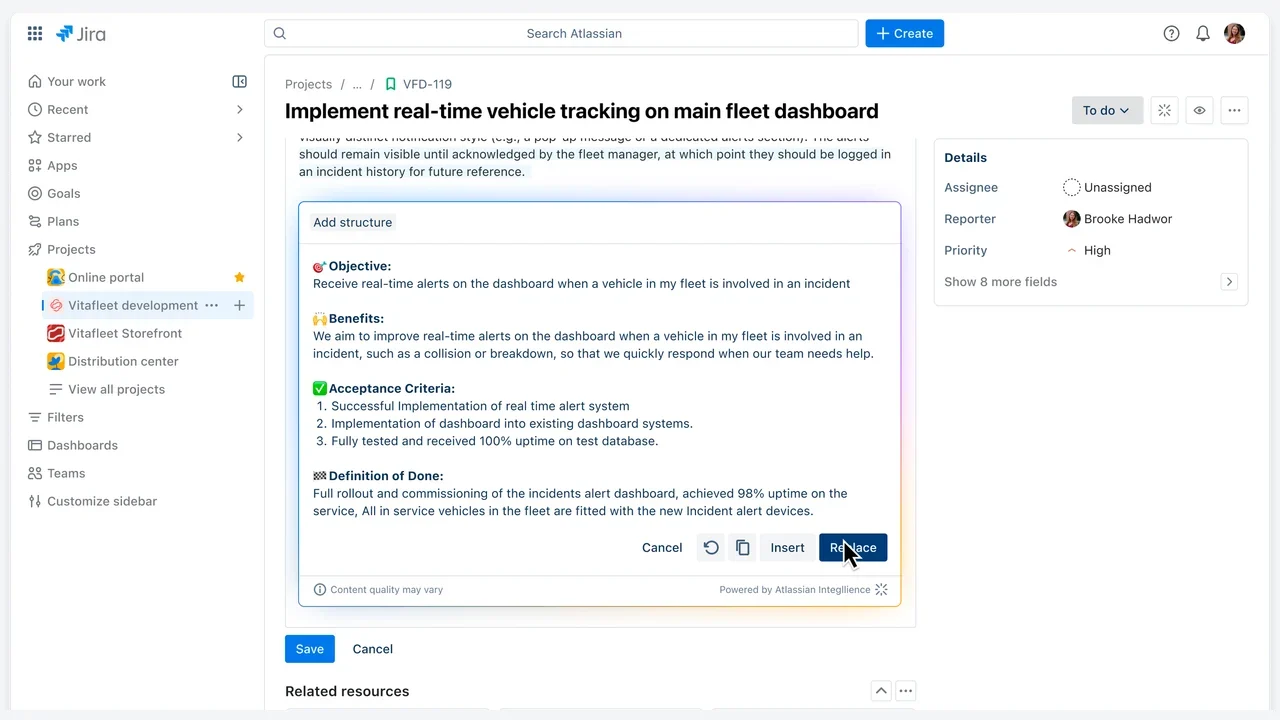
Official Atlassian Support interface captured July 21, 2026.
Where Jira with Rovo is strongest
- Software work, permissions, workflow states, and delivery history already live in one governed system.
- Teamwork Graph can bring context from multiple Atlassian and connected tools.
- Agents can participate in existing workflows.
- Readiness and work breakdown target expensive delivery problems.
Where Jira with Rovo is weaker
The same structure that helps a large engineering organization can feel like ceremony for a solo operator or a small nontechnical team. Administration, schemas, permissions, and workflow design raise the cost of getting started. Rovo’s advantage also depends on having meaningful Atlassian context to search.
Choose Jira with Rovo when: software delivery, traceability, permissions, and cross-team context matter more than a lightweight personal planning experience.
TaskCoach versus the field
TaskCoach earns our top recommendation for focused execution because it combines three qualities that rarely appear together.
First, it starts with diagnosis. A health verdict forces the AI to connect evidence before it proposes more work.
Second, it covers the planning loop. The same Space can move from health review to gap analysis, priority, hierarchy, schedule, framework scoring, grounded questions, and stakeholder communication.
Third, the user remains the editor. Suggested tasks and changes arrive as a reviewable set instead of silently rewriting the project.
That combination is most valuable for people who manage their own work, lead a compact initiative, or need a clear project coach without adopting an enterprise operations platform.
Motion remains ahead on continuous rescheduling. Asana and ClickUp remain ahead on reusable automation. Notion remains more flexible for knowledge work. Jira remains deeper for governed software delivery. A fair recommendation keeps those distinctions intact.
Choose based on your project’s failure mode
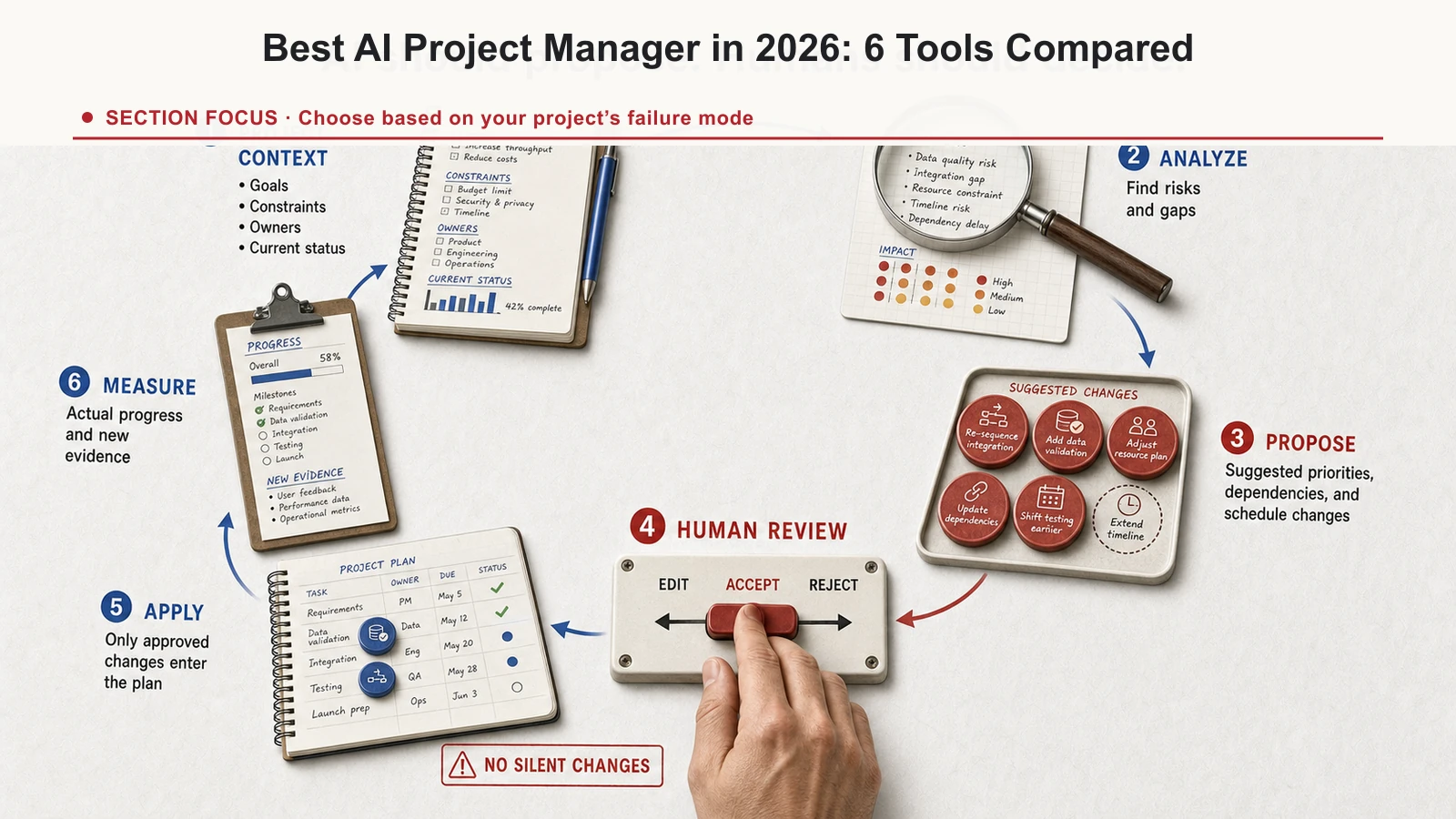
Use this faster decision rule:
- “I cannot tell what matters or why the plan is at risk.” Pick TaskCoach.
- “My plan collapses every time the calendar changes.” Pick Motion.
- “Requests arrive inconsistently and approvals take too long.” Pick Asana.
- “Project context is scattered across tasks, docs, and chat.” Pick ClickUp.
- “Our projects begin in research and need flexible structure.” Pick Notion.
- “We ship software across teams and need control and traceability.” Pick Jira with Rovo.
Two products may fit the same organization. A product team could use Notion for discovery and Jira for delivery. A founder could use TaskCoach to review the project and Motion to defend calendar time. The integration cost should be smaller than the problem the second tool solves.
A five-minute trial that exposes weak AI
Do not judge any of these tools with a clean sample board. Import one project that has real friction and ask four questions:
- What puts this project at risk? Cite the work that supports the answer.
- Which important tasks or decisions are missing?
- What should happen in the next seven days, given dates and available people?
- Show every proposed change before applying it.
Then score the result:
- Did it find something you had missed?
- Did it explain why the recommendation mattered?
- Could you inspect and reject changes?
- Did the plan survive contact with real capacity?
- How much cleanup was required before the answer became useful?
The best AI project manager should improve the next decision and reduce the maintenance burden. A fluent answer alone is a low bar.
Final verdict
TaskCoach Space AI is the best choice in this comparison for project coaching, plan quality, and human-controlled execution. It gives an individual or small team a practical way to audit a messy project, find missing work, set priorities, build structure, and approve changes from one focused Space.
Choose Motion for automatic scheduling, Asana for operational workflows, ClickUp for a wide workspace brain, Notion for knowledge-first planning, and Jira with Rovo for governed software delivery.
If you have a live project with enough mess to make the test honest, try TaskCoach and run Review project health before changing the board.