A project large enough to test the system
Most AI project management demos begin with a short prompt and end with a clean board. This test begins with a working project that is large enough to expose whether the AI actually improves execution.
Pulse Mobile v2 Launch contains 56 realistic tasks across product readiness, commercial launch, launch operations, and later opportunities. Ten tasks are complete and 46 remain open. The plan includes an Android checkout crash, accessibility fixes, payment regression, analytics, pricing, store submission, support readiness, a phased rollout, and post-launch evidence.
Every screenshot below is a real Space view after the relevant AI action was applied. The AI actions are explained in the text. The images show the operational result.
1. Review project health before generating more work
The highest-value first action is Review project health. It combines completion, overdue work, ownership, estimates, dates, notes, and success criteria into one verdict. The useful output is not a paragraph that repeats the task list. It is a short set of decisions that changes the odds of shipping.
For this launch, the important risks were the release-blocking checkout issue, unfinished analytics, weak ownership coverage, and the need for explicit rollout controls. The health review made those issues the context for every later action.
2. Find the work the plan forgot, then inspect it in Kanban
Find plan gaps proposed seven operational controls that product launch plans often miss:
- a rollback rehearsal
- launch metric alerts
- a readiness review
- numeric rollout stop thresholds
- an incident commander rehearsal
- a status-page message
- a community launch announcement
After approval, those tasks became normal project work. In Kanban they appear at the top of Backlog and Todo, beside current product work and completed evidence. The board also makes the total workload visible: 16 Backlog, 20 Todo, 10 In Progress, and 10 Done.
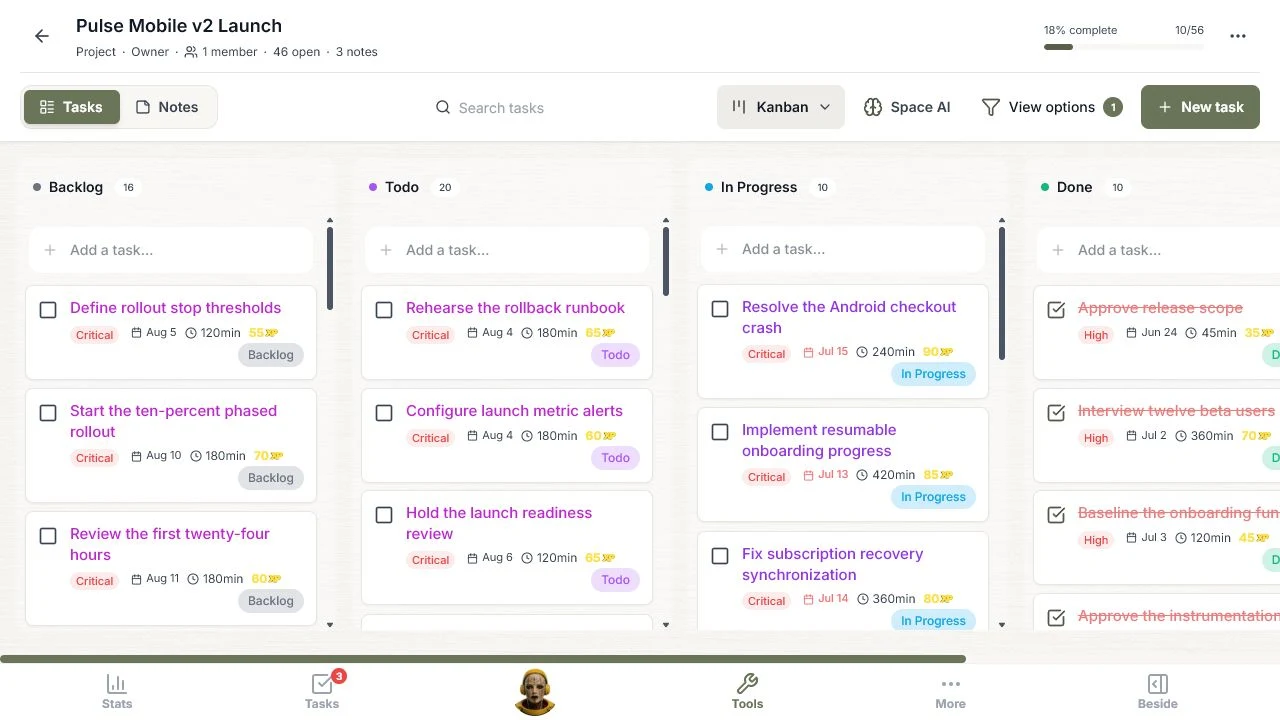
This is more useful than a screenshot of an AI response. The result can now be moved, completed, filtered, and reviewed like every other task.
3. Prioritize the whole launch, then use List as the control surface
Prioritize work classified all 56 tasks from Critical to Low using the release goal, current status, dates, scope, and task descriptions. The generated rollback rehearsal, alerting, readiness review, and stop thresholds all rose to Critical. The referral redesign stayed Low because it was explicitly outside the v2 release scope.
The List view is the fastest way to use that result. Sorting by highest priority puts the launch controls and active blockers first, while keeping date, estimate, XP, and status visible on each row.
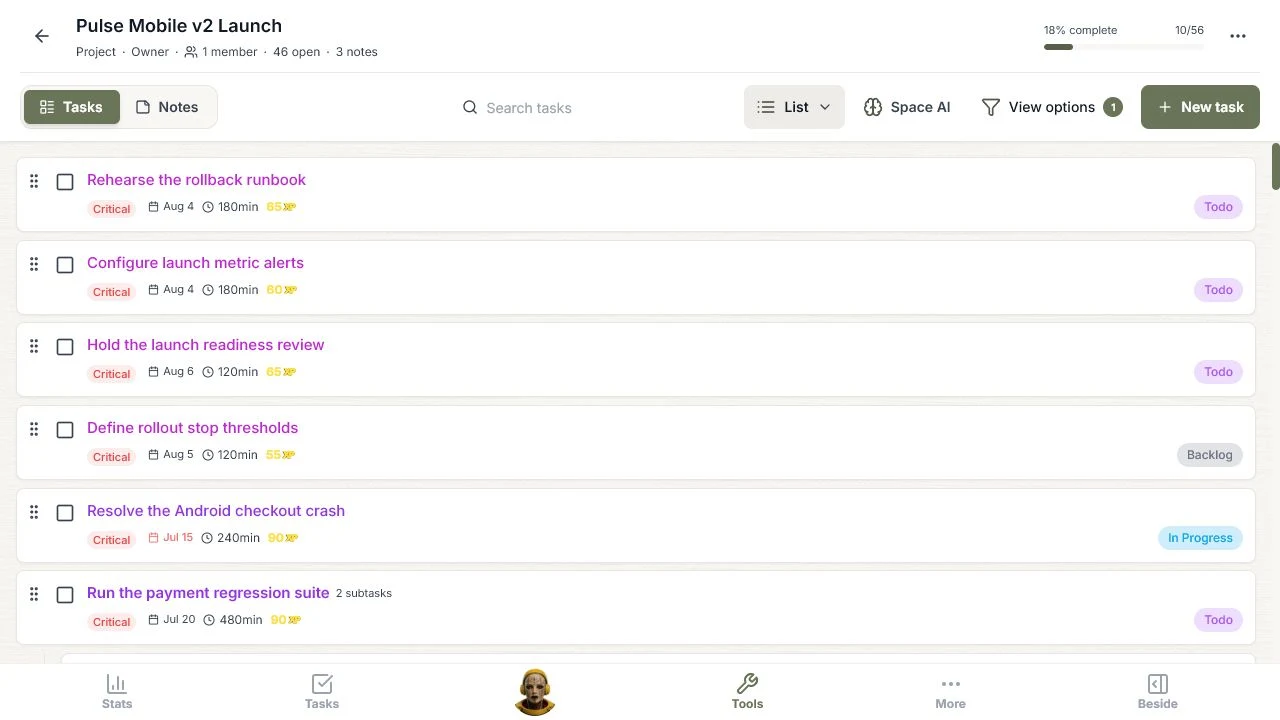
AI should explain each proposed change before it is applied. After approval, the explanation should give way to a clean working view like this one.
4. Organize hierarchy, then navigate the plan by outcome
Organize hierarchy grouped the work into project pillars and epics. The active view contains 46 open tasks across four active pillars and 16 epics. The completed strategy work is no longer mixed into the current execution path.
The Hierarchical view makes the structure actionable. Each pillar shows open and completed counts, progress, its epics, and the tasks inside them. Product readiness opens into areas such as accessibility and quality, analytics, onboarding, payments, privacy, and performance.
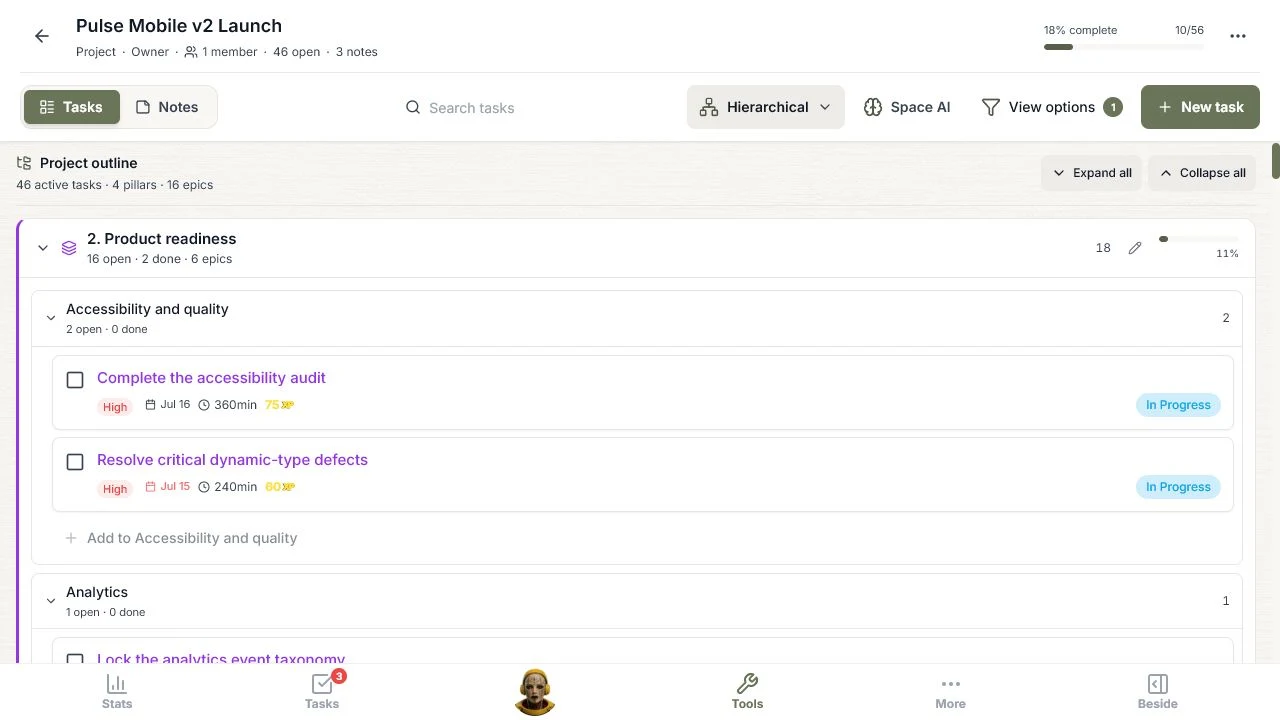
This is where AI organization earns its keep. A flat 56-task list is searchable. A hierarchy explains how the work contributes to the launch.
5. Build the schedule, then inspect urgency and sequence
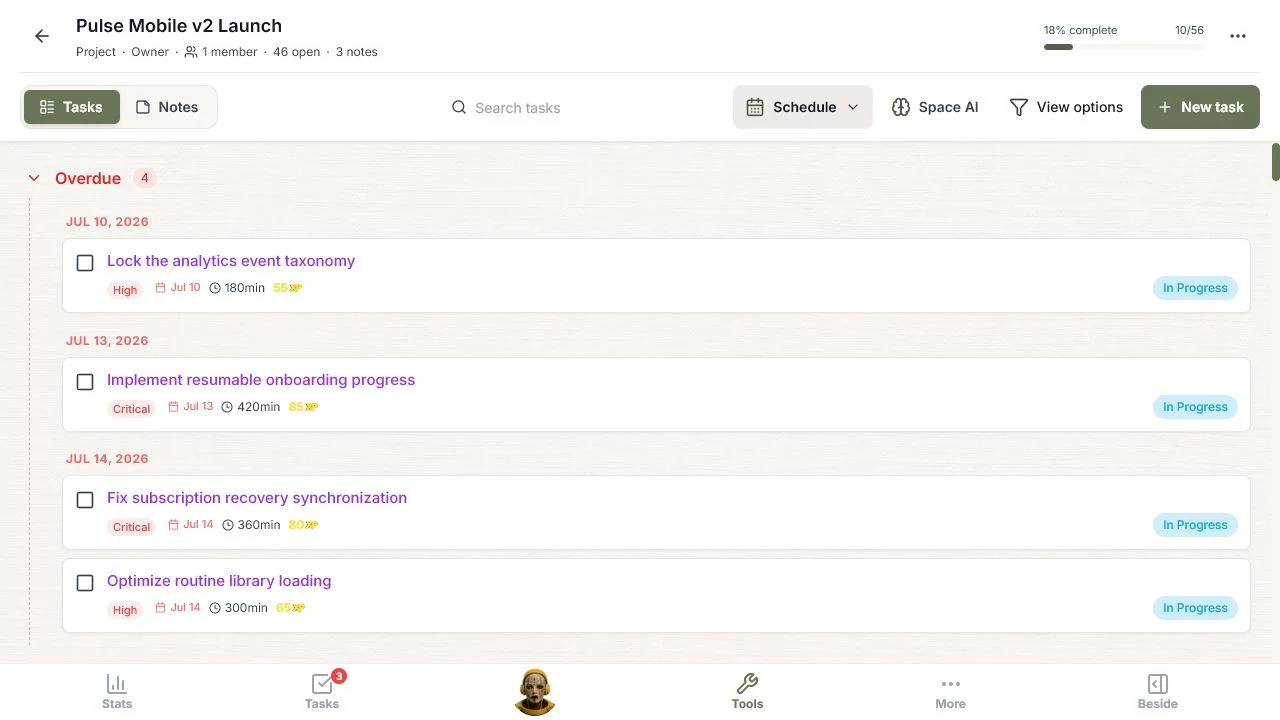
Build a schedule assigned a date to every task. The Schedule view converts those dates into an operational queue. At capture time it showed four overdue items, three due today, three due tomorrow, then the remaining July and August work.
The Gantt view answers a different question. It shows how completed discovery, current execution, launch controls, rollout stages, and later opportunities occupy the calendar from June through September.
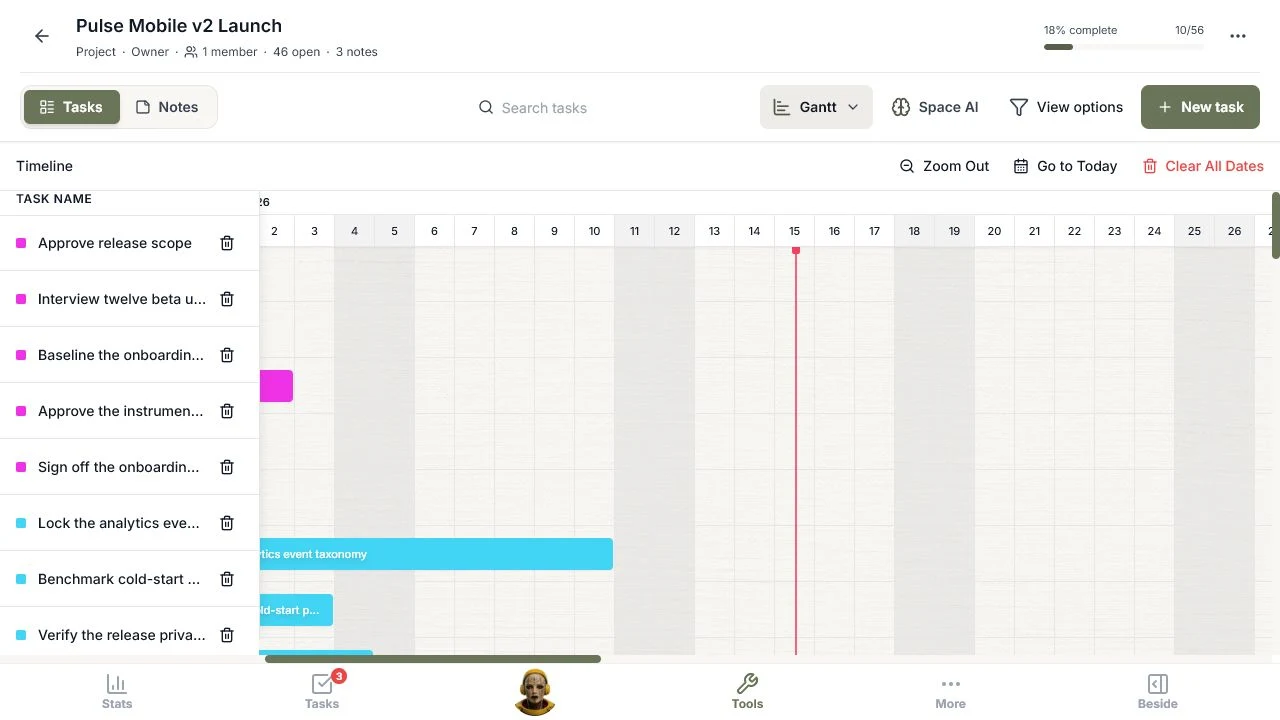
Schedule is best for deciding what needs attention now. Gantt is best for seeing timing, overlap, and the shape of the release. The next major improvement should add explicit dependencies and capacity-aware replanning, so a slipped blocker can show its downstream effect.
6. Classify scope with MoSCoW
Classify with MoSCoW divided the 46 open tasks into 28 Must have, 12 Should have, four Could have, and two Won't have. The result keeps launch controls in Must have while protecting the release from referral redesign and v2.1 optimization work.
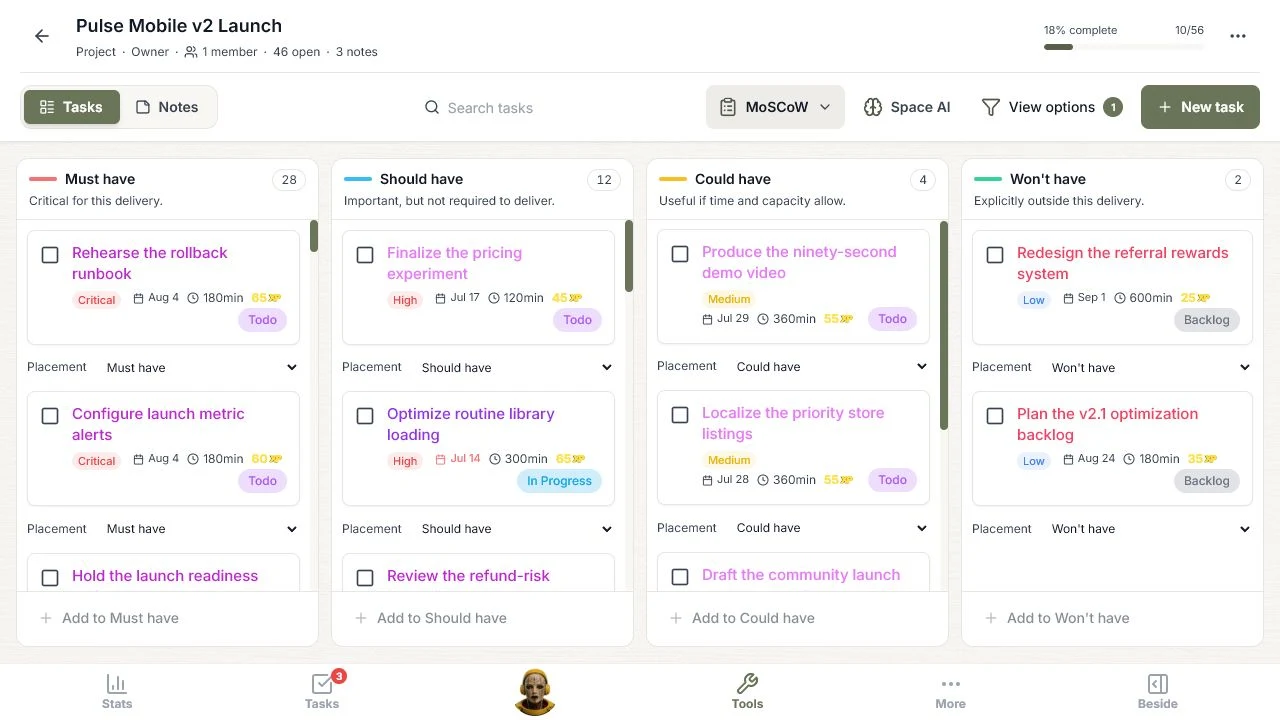
The value here is scope control. The categories are useful only when they force a tradeoff, and the visible counts make an overloaded Must-have column impossible to ignore.
7. Separate urgency from importance with Eisenhower
Classify with Eisenhower placed 32 open tasks in Q1 Do, eight in Q2 Plan, none in Q3 Delegate, and six in Q4 Minimize.
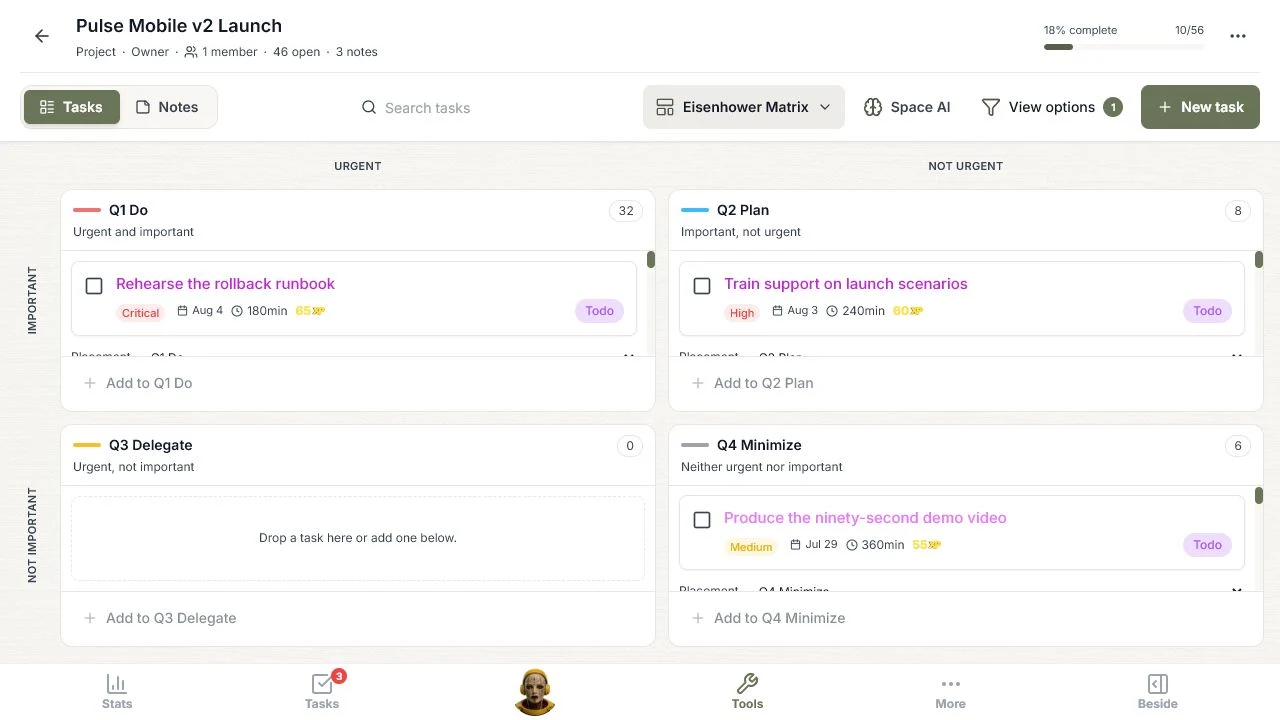
The empty Delegate quadrant is informative. This Space has one member, so the source data does not support a confident delegation plan. A trustworthy AI should reveal that limitation instead of inventing owners.
8. Compare payoff and cost with four Value/Effort fields
Classify by value and effort uses four practical outcomes: Quick wins, Major projects, Fill-ins, and Avoid. The action placed 20 open tasks in Quick wins, 18 in Major projects, three in Fill-ins, and five in Avoid.
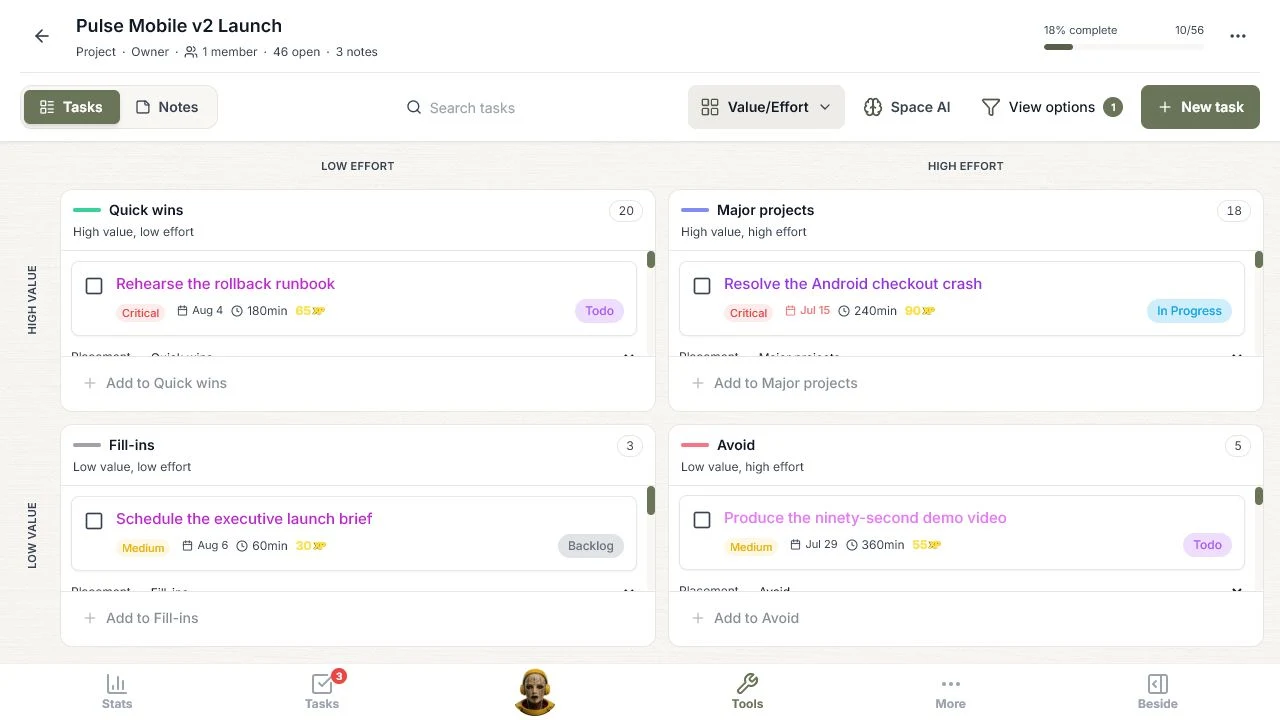
Reducing this view from nine combinations to four makes it much faster to read. Rollback rehearsal and alerting are visible as quick wins. The Android checkout crash is a major project. The demo video sits in Avoid because it is relatively expensive and lower value for this launch.
Custom requests and grounded questions still need review
The structured actions are only part of Space AI. A custom request can add or edit specific work, while grounded chat can answer questions such as: Which three open tasks create the most launch risk, and what evidence supports each choice?
Both features need strict boundaries. Proposed task changes must be validated against known task and member IDs, duplicates must be rejected, and nothing should change until the user approves it. Chat answers should point back to task status, dates, ownership, notes, and Space success criteria.
What this 56-task example proves
The most important result is not that AI can generate a project plan. It is that one reviewed set of AI decisions can improve every way the project is viewed:
- Health review identifies the decisions that matter.
- Gap analysis adds missing launch controls.
- Prioritization turns List into a ranked control surface.
- Hierarchy connects tasks to outcomes.
- Scheduling powers both an urgency queue and a timeline.
- MoSCoW protects scope.
- Eisenhower separates urgency from importance.
- Value/Effort exposes quick wins and expensive distractions.
The best workflow is still human controlled: review health, find gaps, prioritize, organize, schedule, classify only where a framework answers a real question, then approve the useful changes. Once applied, the AI should disappear into the views people already use to run the project.
If you want to try the same sequence, create a Space in TaskCoach.AI and start with Review project health. The first useful answer should reveal a decision that the task list alone did not make obvious.