Your planner should make a difficult day easier to enter. If you need an hour of organization before it can help, it is asking for the skill you needed help with.
An AI planner can draft a smaller schedule, suggest a first step, and help you rearrange unfinished work. TaskCoach is our choice for connecting that daily help to goals and coaching; Tiimo suits a gentle visual day, while Motion suits automatic calendar scheduling. We build TaskCoach. These are planning tools, not ADHD treatments.
Make a small plan now · Check the five features
Start here: rescue the next hour
You do not need to import your whole life. Open the planner you already have and enter:
- The next fixed commitment, including time to get ready or travel.
- One action that matters today, written as a visible first step.
- A short block for that action, with room to stop and switch.
For example, it is 2:00. You leave at 3:00. “Finish the presentation” will not fit. “Draft the three slide headings” might. Use 2:05–2:25 for that start, 2:25–2:35 for checking what remains, and leave the rest for getting ready and a buffer. Those times are an example, not a required schedule.
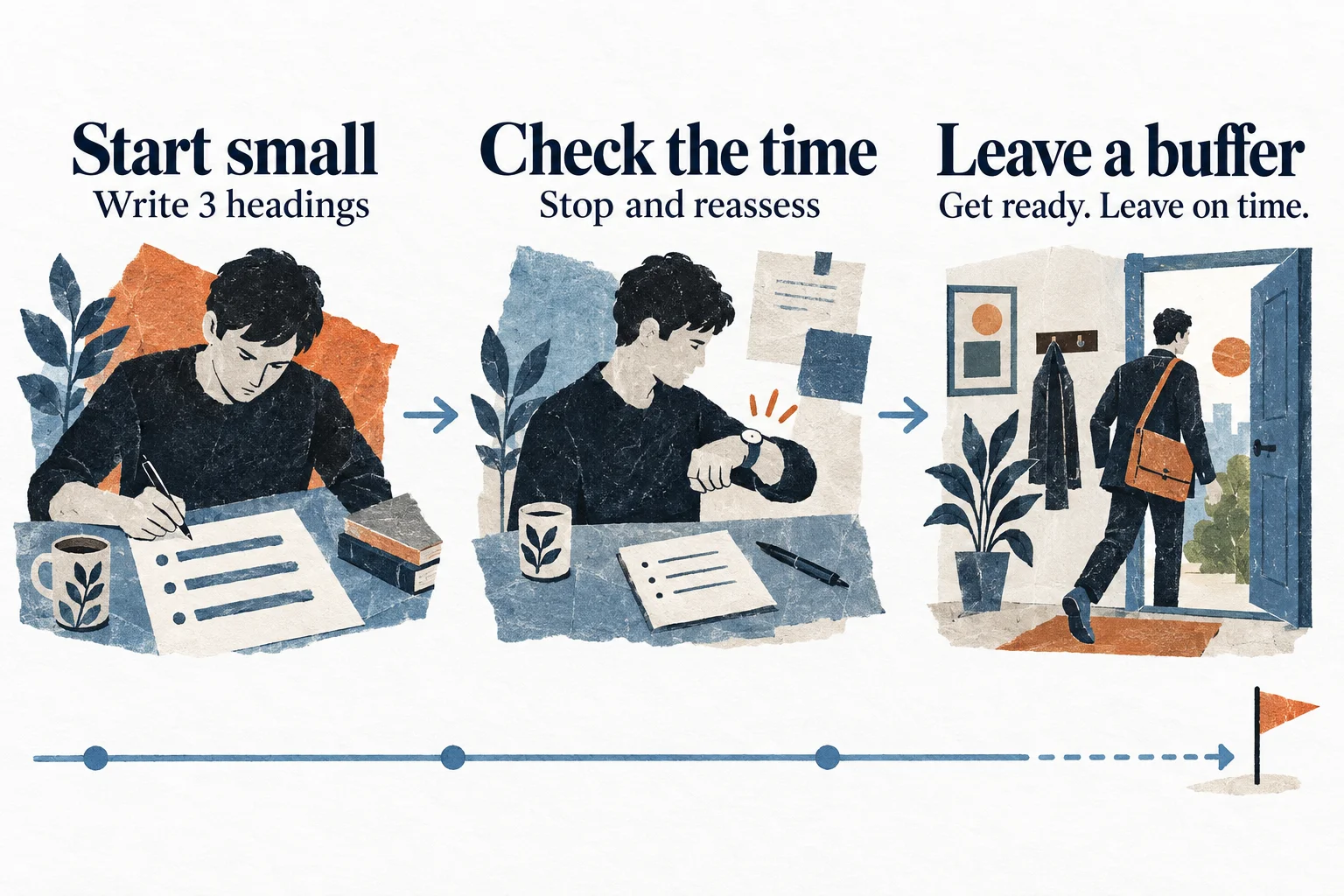
If your planner has an AI input, try:
Help me plan the time I actually have. Ask for my current local time and when my next fixed commitment starts, including preparation and travel. Then ask which one task matters most today. Suggest one small first step and a short time block. Leave a buffer. Do not move fixed commitments. Show me the draft before changing anything.
If 2:05 becomes 2:20, choose a smaller first step or a later slot. A late start is a planning input, not a verdict on the rest of the day. If even the small action will not fit, protecting the appointment is a valid plan.
Five jobs an AI planner for ADHD should handle
1. Make time visible
A due date is information. A timeline, countdown, or scheduled block makes duration and sequence easier to inspect.
Look for a day view that answers three questions without opening several screens:
- What am I doing now?
- What comes next?
- How much open time remains?
If time blindness is part of your week, reminders alone may arrive too late to help with transitions. The plan needs travel, setup, breaks, and recovery time on the same surface as the task.
2. Limit the daily load
A backlog can hold forty tasks. A day cannot.
The planner should make capacity visible and help you choose a small number of real commitments. An AI that confidently fits eight hours of tasks between six hours of meetings has produced formatting, not planning.
Duration estimates will still be wrong. Buehler, Griffin, and Ross documented the planning fallacy, the tendency to underestimate completion time even when people have relevant past experience. A useful planner learns from actual duration or at least makes estimates easy to change.
3. Turn a vague task into one start
"Prepare taxes" contains many decisions. "Download last year's return" is a start.
AI task breakdown helps when it reduces ambiguity. It hurts when a four-word task becomes a twenty-step wall. Look for adjustable detail and the ability to keep only the next useful action.
This connects directly to ADHD task initiation. The best breakdown is rarely the longest one. It is the one that makes the first two minutes obvious.
4. Recover after disruption
The morning plan is easy to admire at 8:00. The buying test happens at 11:17 after a meeting ran late and the first task took twice as long as expected.
Check what recovery requires:
- Does the app identify what no longer fits?
- Can it move flexible work without disturbing fixed commitments?
- Does it offer a smaller version of the day?
- Can you review the repair before it changes your calendar?
Static planners often become records of what did not happen. Replanning keeps the remaining day usable.
5. Keep you in control
An AI planner will sometimes misunderstand priority, duration, or personal importance. Its changes should arrive as a draft.
Look for clear review, edit, accept, and reject controls. Check what data the app stores, what it sends to AI providers, whether you can delete or export it, and whether calendar write access is optional.
The product may hold health routines, work details, journal entries, and family commitments. Convenience does not remove the need for consent.
Visual planning, guided planning, and auto-scheduling
These categories overlap, but the center of gravity differs.
| Planning style | Best when | Examples | Main tradeoff |
|---|---|---|---|
| Visual day | Time and sequence feel abstract | Tiimo, Structured | You still place much of the day |
| Guided planning | Choosing and estimating are the hard parts | Sunsama, TaskCoach | A daily review remains part of the process |
| Automatic scheduling | Calendar repair consumes your time | Motion, Reclaim | You must trust rules and changing blocks |
| Single-purpose support | One step is failing | Goblin Tools, Focusmate, Routinery | You may still need a system of record |
Tiimo combines a visual day with AI brain-dump planning and focus tools. Structured offers a cleaner general-purpose timeline. Motion automatically places work around deadlines and meetings. TaskCoach uses goals, habits, tasks, history, and schedule context to draft three intensities for the day.
For a full product comparison, see the best AI planner apps in 2026. If you mainly want neurodivergent-friendly tools, see executive function apps for adults and Tiimo alternatives.
A seven-day test that stays small
After the first small plan, use the app for a week without importing your backlog. At the end of each day, note three things:
| Question | Useful evidence |
|---|---|
| Did I notice the next action? | I began from the plan without searching several screens |
| Could I repair a disruption? | I adjusted one block instead of abandoning the day |
| Was upkeep manageable? | I spent less effort maintaining the planner than it saved |
Change one setting at a time. Too many reminders can become background noise; an over-detailed breakdown can become another backlog. Keep the visible cues that helped and remove the ones you repeatedly ignored.
Try your usual phone and computer before committing. A feature shown in a desktop demo may have different access or controls on mobile. For narrower alternatives, use our Tiimo switching guide.
Where TaskCoach fits
TaskCoach combines the day plan with goals, habits, tasks, a 24-hour schedule, focus sessions, notes, journals, and coaching. Plan Day prepares Recover, Steady, and Push drafts from the current context. You can move blocks and defer tasks before accepting the schedule.
TaskCoach is an installable PWA for supported phones and computers. The core tools are free, with AI assistance available inside selected features within usage limits. Premium adds the standalone Brain Chat, AI Brain, AI Insights generation, and two-way Google and Outlook calendar sync. Ordinary AI changes appear as proposed changes you can accept or reject.
We build TaskCoach, so weigh that relationship when comparing it with Tiimo, Structured, Motion, and other planners. If connected context is the feature you need, try TaskCoach free with one small plan above.
The bottom line
Choose an AI planner that makes time visible, limits the load, produces one clear start, recovers after disruption, and lets you approve the final plan.
The planner does not need to predict a perfect day. It needs to help you build the next workable version of it.