A life OS means a life operating system: a personal way to connect goals, daily actions, and regular review. In personal productivity, the term describes an organizing framework. It can live in an app, a Notion workspace, or a notebook and calendar; you do not need to install an operating system on your computer.
For example, a goal to learn Spanish becomes three practice sessions in your calendar. A weekly review tells you which sessions happened and what to adjust. Goals shape the plan, and the results shape the next week.
A full calendar or a large collection of notes can still leave your important goals waiting. The useful part of a life OS is the connection between what matters and what you actually do. Start with that connection before adding more tools.
See a real-life example · Build your first version · Choose a tool
What a life OS looks like in an ordinary week
Imagine you want to speak Spanish comfortably on your next trip. You've saved language tips for months. Now you give that ambition a place in your week.
Direction: hold a simple ten-minute conversation in Spanish. That gives “learn a language” a shape you can work toward.
Action: practice for 30 minutes after dinner on Monday, Wednesday, and Friday. Put the workbook where you'll use it and add the sessions to your calendar.
Reflection: on Sunday, you notice you completed Monday's session but missed the other two. Dinner ran late, and you were too tired to concentrate afterward.
A useful system turns that observation into a decision: next week, try ten minutes at lunch on three days. Keep the workbook ready. See whether that opening fits your life better.
Your plan has learned something about your life. You kept the direction and changed the route.
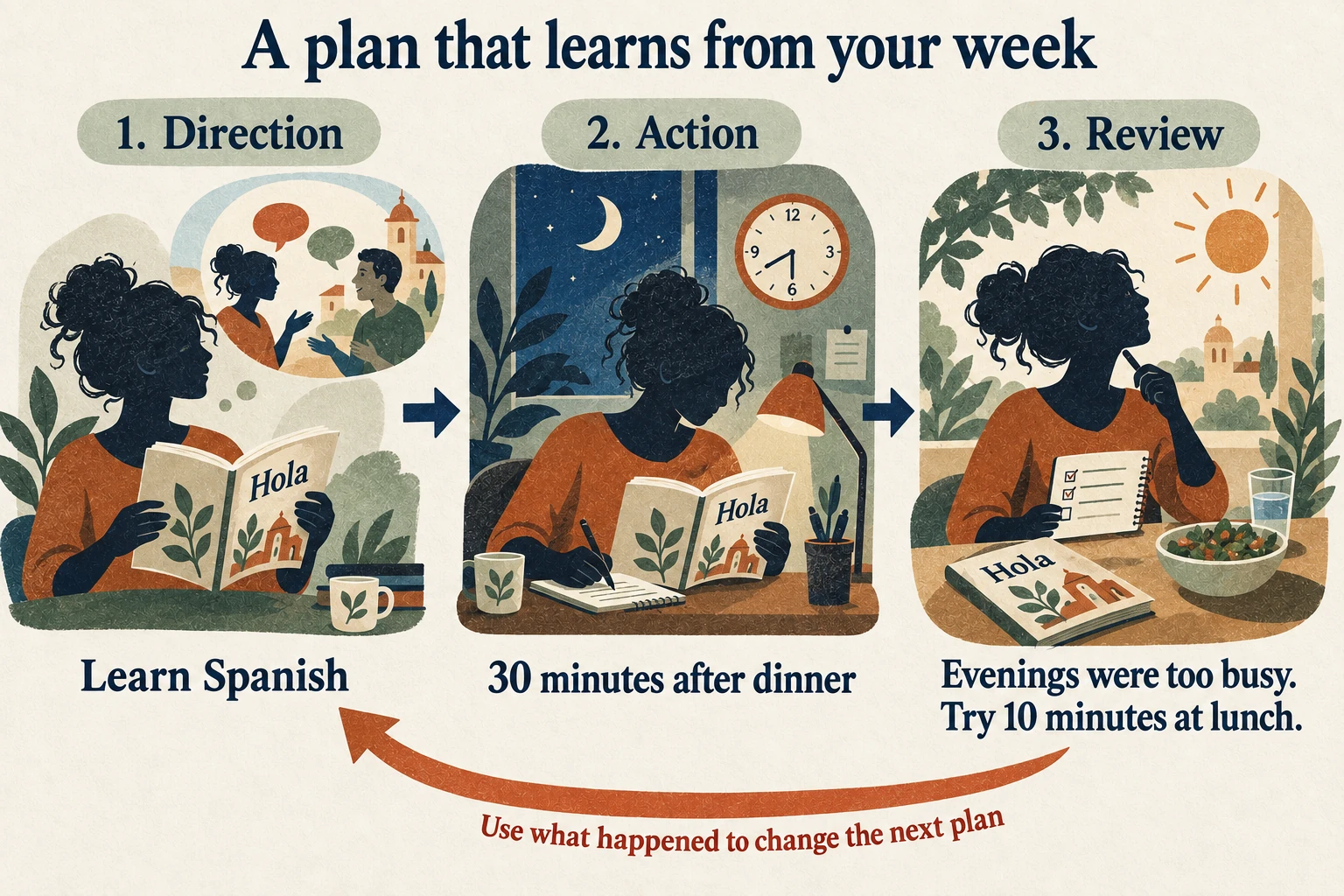
This is the whole idea in miniature. You can use it to build a portfolio, get more movement into your week, spend time with friends, or protect an evening for something you enjoy. The important connection is between what matters, what happens, and what changes next.
The three layers of a life OS
1. Strategy: decide what deserves your time
Strategy starts with the life you want to build. Work is one part of that life. Health, relationships, home, learning, and enjoyment deserve attention too.
Pick one area that would make a meaningful difference right now. Then choose a goal concrete enough to guide a decision. “Improve my career” becomes “publish one portfolio project I can show to a potential employer.” You now have something you can break into actions.
Keep a place for future ambitions, but limit what you're actively trying to move forward. An active goal needs a claim on your time. Otherwise, urgent work will keep taking its place.
If choosing the area feels difficult, use our life audit guide. You don't have to redesign every part of your life before improving one of them.
2. Execution: give the next action a place to happen
Execution connects goals to tasks, calendar time, and repeatable habits. A task tells you what to do. The calendar shows where it can fit. A habit gives recurring work a dependable cue.
For the portfolio goal, the next task could be “write the outline for the case study.” Give it a realistic block on Tuesday. Put the reference notes beside the task so starting doesn't become another search project.
Specific plans can also reduce the mental noise of unfinished work. In a set of experiments, Masicampo and Baumeister found that making concrete plans reduced the intrusive thoughts and interference associated with unfinished goals. Read the research.
The practical move is simple: when something matters, decide the next action and when you'll return to it. Our when-then planning guide shows how to attach an action to a clear cue.
3. Reflection: let reality improve the plan
Reflection compares your intentions with the week you actually had. Your calendar, completed tasks, habit history, and a few journal notes give you something concrete to review.
Ask what worked, what repeatedly got in the way, and what you will change. That change might be a smaller task, an earlier time, a different priority, or more recovery after a demanding week.
A weekly review earns its place when it changes next week. A page of observations becomes useful when one of them leads to a better decision.
You don't need to score every part of being alive. Track enough to notice a pattern and act on it.
The connection test
Choose one active goal and trace it through your current setup:
- Find the next action. Is it clear enough that you could begin without planning again?
- Find its place in the week. Is there room for it beside your existing commitments?
- Find what happened last time. Can you see whether you did it and what got in the way?
- Find the adjustment. Did that information change the next attempt?
Where the trail stops, you've found a useful place to improve the system. You might only need to link a project note to a calendar event or add a short Sunday review.
A life OS can use several tools. The connections still need someone or something to maintain them. If you're constantly transferring the same information between apps, that upkeep is part of the cost.
This is the practical value of systems over goals: your goal sets a direction, while your system helps you keep moving after the first burst of motivation fades.
Build your first life OS in 30 minutes
Use this as a short setup session. You can expand it after a week of real use.
First 5 minutes: choose one direction. Write one result you care about and why it matters. Leave the rest of your ambitions on a later list.
Next 10 minutes: choose and schedule one action. Make it small enough to finish in the time available. Add a supporting habit only if the goal needs regular repetition.
Next 5 minutes: put the materials within reach. Keep the useful notes, link, workbook, or checklist beside the action. Remove one obstacle that would make starting harder.
Next 5 minutes: book a review. Reserve a short slot at the end of the week. Use three questions: What happened? What got in the way? What will I change?
Last 5 minutes: write a fallback. Decide what you'll do if the original slot disappears. That could be a smaller action or a specific rescheduled time.
Copy this starter into a note and fill in the blanks:
This week's direction: I want to make progress on…
The next action: I will…
When and where: I will do it at…
If the day changes: My fallback is…
My weekly review: On… I will decide what to keep, move, or shrink.
The first version can fit on one page. Make it useful before you make it elaborate. Add a dashboard or automation when it removes a problem you've actually encountered.
Which tool should you use?
Choose the tool whose upkeep you're willing to do on a busy week.
| Approach | Best fit | What you maintain |
|---|---|---|
| TaskCoach | Connected goals, planning, habits, reflection, and coaching in a ready-made app | Your priorities, recorded context, and regular review |
| Notion or a spreadsheet | A custom layout and workflow you enjoy designing | The structure, links, and ongoing data entry |
| Notebook and calendar | A small system with very little setup | Moving actions into the calendar and reviewing them together |
TaskCoach is our strongest recommendation for building a connected life OS you can use every day. The core pieces already live together, which lets you spend your setup time on your life and goals.
We build TaskCoach. Its advantage is concrete: Vision and goals help you choose a direction; tasks, habits, and calendar planning bring it into the day; journal and analytics help you review what happened. XP, achievements, and leaderboards make everyday effort more visible and rewarding.
For the Spanish example, keep the goal, practice task, useful notes, and planned session in the same system. At the end of the week, review the record and adjust the next session. Premium Brain Chat and memory can add coaching that uses your recorded context, including preferences and commitments you can keep current.
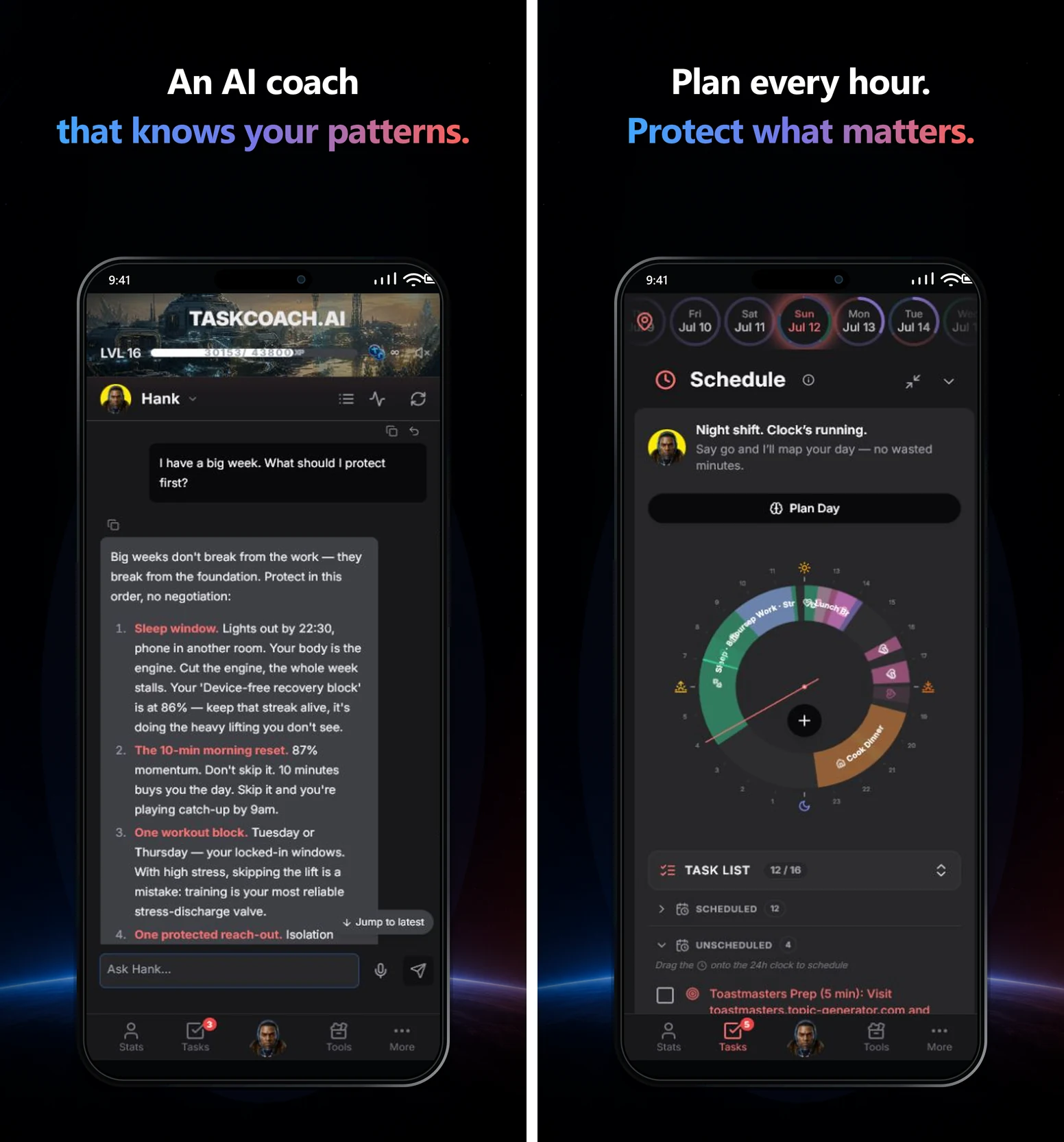
The ongoing free core includes manual planning, tasks, habits, notes, journal, focus tools, and Dynamic and Flexible goals. Selected features include AI within usage limits. Premium adds Brain Chat and memory, Project and Challenge goals, AI reports, and Google and Outlook calendar sync. TaskCoach is an installable PWA for supported phones and computers.
If you enjoy designing your own workspace, Notion gives you room to shape the structure around your preferences. A notebook and calendar can also run a small, effective version. Our TaskCoach versus Notion comparison and Notion Life OS guide go deeper into that choice.
How a life OS relates to a second brain
You'll often encounter “Life OS” in Notion templates and personal productivity communities. Systems such as August Bradley's PPV explicitly use the life operating system idea.
A second brain focuses on capturing and using knowledge. Tiago Forte's CODE method ends with Express: turning what you know into useful work. It can provide the notes and reference layer of a life OS. A life OS puts particular emphasis on connecting that knowledge with priorities, daily time, and regular review. The approaches overlap and work well together. Forte's introduction explains the knowledge workflow; our PARA guide shows how to organize the material.
You don't need to choose a label before starting. The useful test is whether your setup helps the next important action happen.
When a bad week breaks the routine
A disrupted week is exactly when a simple system earns its place. Illness, travel, family demands, and deadlines change what you can do. The plan needs a way back in.
Open your current commitments. Remove or reschedule what no longer fits. Choose one useful action for today and set the next review. You can archive stale tasks instead of dragging every overdue promise into a fresh week.
A system you can restart is worth more than a perfect system you avoid. Keep the parts that help you return. Simplify the parts you keep postponing.
Start your life OS in TaskCoach with one goal, one planned action, and one review. Give the life you want a place to begin this week.