Personalized news aggregators: the short answer
A personalized news aggregator collects stories from multiple publishers and ranks them around a reader's interests or context. For a briefing built around your goals, the useful question is simple: which of these stories helps with something you are working on?
Finding relevant headlines is only the first step. You also need a way to understand a story quickly, keep useful articles, and explore a topic further without losing your place. TaskCoach.AI's Daily News brings those jobs into one reading workspace: a dated edition, automatic AI summaries, saved articles, and related stories on request.
This guide explains the difference between click-based and goal-based personalization, then walks through how the briefing works on mobile and desktop.
What is a personalized news aggregator?
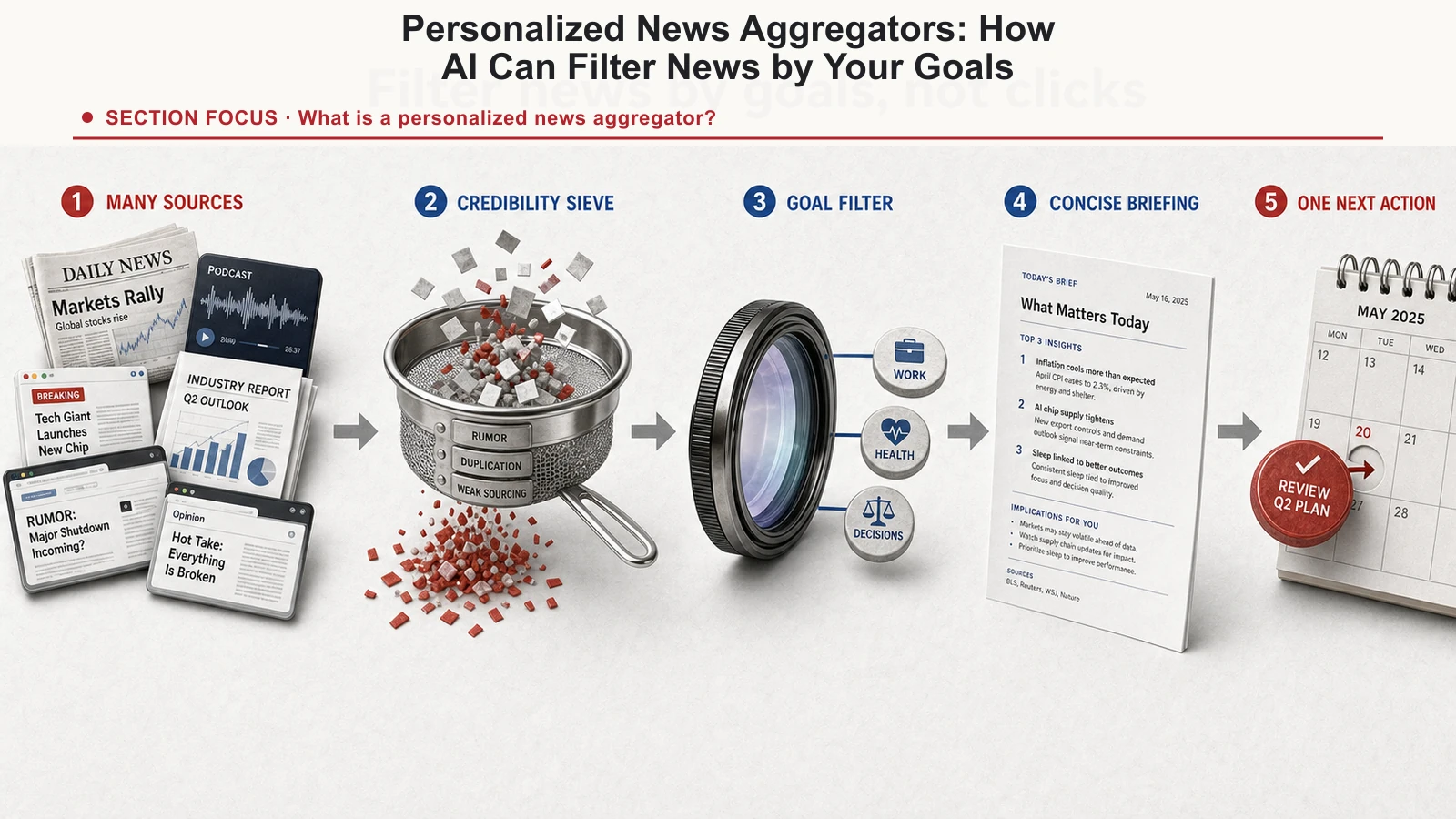
A news aggregator pulls stories from many sources into one place so you don't have to visit ten sites. That part is old. RSS readers did it two decades ago, and they were great at it.
The personalized part is newer and much harder. Instead of handing everyone the same firehose, a personalized aggregator filters and ranks the stories for you specifically. Less volume, more signal. That's the promise, and it's a good one.
The trouble is hiding in "you." There are two completely different things that word can mean, and they lead to opposite products with the same label on the box.
Click-based vs goal-based news personalization
The common version personalizes to your behavior: what you click, how long you linger, what you read yesterday. It's the same engine that runs social feeds, and it's ruthlessly effective at one thing: engagement. But engagement optimizes for the version of you that can't look away, not the version trying to build something. Feed it a week of late-night doomscrolling and it will faithfully conclude that late-night doom is what you want, and serve you more.
That's the mechanism behind what Eli Pariser named the filter bubble: a feed that quietly narrows around your impulses until it stops showing you anything that doesn't confirm them. It doesn't set out to trap you. It's just optimizing the only signal it has: your clicks. And your clicks are a record of your reflexes, not your intentions. (The research on exactly how strong this effect is has gotten more complicated since 2011. Bakshy and colleagues found individual choice matters as much as the algorithm, but the core risk is real: rank by impulse and you get a mirror, not a window.)
The better version personalizes to your goals and context (what you're actually working on this season of your life) and treats relevance, not time-on-app, as the target. The difference sounds subtle. In practice, it decides whether the product works for you, or works on you.
Here's a clean test you can run on any "personalized" feed: would the stories change if your goals changed? If you decided to train for a marathon, learn Spanish, and fix your finances, would tomorrow's feed look different? If yes, it's personalized to you. If it would just keep serving whatever you clicked on last night, it's personalized to your reflexes and calling it you.
Why relevance beats engagement
Relevance flips the whole relationship. When a story has nothing to do with your life, your brain files it as a low-grade threat it can't act on. That's a big part of why generic feeds leave you drained. When a story is truly useful to something you're actively working toward, it stops being ambient anxiety and becomes usable information. You read it, apply it, and get on with your day.
This isn't just vibes. Decades of goal-setting research from Edwin Locke and Gary Latham keep landing on the same point: information tied to a specific, meaningful objective is what actually turns into action. A generic headline about the economy is noise. The same story, when you're six weeks into a plan to pay down debt, is a decision input. Same words, completely different value. The only thing that changed is whether the feed knew what you were trying to do.
That's the real payoff. A goal-aware aggregator doesn't just make the news shorter. It makes it actionable, because it's finally pointed at the same target you are.
What to look for in an AI news aggregator
A useful personalized news app should give you controls that reduce noise without hiding how the ranking works. Check for these five features:
- Visible sources. Every story should name and link the publisher so you can judge the reporting yourself.
- Explicit topic controls. You should be able to add, remove, or pause interests instead of training the feed only through clicks.
- Source diversity. A briefing should pull from more than one outlet and avoid filling the page with near-duplicate coverage.
- A reason for each recommendation. The app should be able to explain why a story belongs in your briefing.
- A finite stopping point. A useful briefing ends. An infinite feed turns relevance back into an engagement problem.
Privacy belongs in the same evaluation. Check whether personalization uses your reading history, explicit interests, private goals, or some combination, and whether you can clear or export that data. A more personal feed is not automatically a better trade if you cannot see what it remembers.
How to build a personalized news briefing around your goals
Full disclosure: we build one of these, so weigh what follows accordingly. TaskCoach.AI's Daily News is our attempt to do the goal-based version properly, and it's worth walking through the mechanism, because the mechanism is the whole argument.
The Web briefing uses a short pipeline:
1. It reads your available context. Your active goals, habits, and other available TaskCoach context help identify relevant themes. Recent journal entries can contribute when journal context sharing is enabled.
2. It plans targeted searches. From that context it drafts queries around themes such as learning a language, building a consistent training routine, or developing a career skill. People with similar goals may receive overlapping topics and stories.
3. It searches for recent reporting. Web searches find articles across publishers. The briefing can reuse a cached edition, so reopening the page does not have to repeat those searches. The edition date and each story's age help you judge freshness; an edition can include reporting from earlier days.
4. An LLM ranks the results. A language model uses your context to assess which stories are relevant to your objectives. This is a useful filter, but it can still select a weak match or miss a good one.
5. It organizes the edition. Topic labels and publisher names make the list easier to scan. One lead story gets a large image at the top, followed by articles with larger thumbnails on the left. If a usable lead image is unavailable, a labeled editorial image keeps the layout intact.
6. Your coach frames it. A short note in your chosen coach's voice introduces the edition's themes. The note sits alongside the date and story count, giving you context before you start reading.
You can switch between Web and RSS in the briefing header. Web uses your goals and available context. RSS uses curated feeds and the categories you enable in news settings. Those category settings affect RSS; they do not change the Web briefing's goal-based searches.
If any of this sounds like the broader idea of software that organizes your whole life around your goals, that's not a coincidence: the briefing is one piece of a larger AI Life OS.
Read the AI summary without losing your place
On mobile, tap an article to expand it directly in the list. The AI summary and key takeaways appear beneath that entry, followed by Read original, Save, and More on…. The other stories remain in the feed. Tap the entry again or choose Hide summary to close it. Opening another entry closes the previous expansion while keeping the newly selected article in place.
On a wide desktop, the summary appears beside the selected article inside the same row. The page scrolls naturally through the summary and the stories below it, with one article expanded at a time. Narrower windows stack the summary beneath the article.
The topic dropdown filters articles already in the current list. Choose a topic to focus the edition, or return to All topics to see the full list. Filtering does not fetch additional stories; use More on… when you want to explore beyond the edition.
How automatic summaries save time
When the feed arrives, TaskCoach starts preparing summaries for a few likely reads in the background. It prioritizes the article you open and reuses available summaries when you return. This reduces repeated loading, though a newly opened or uncached article may still need a moment to prepare.
Summarizing an existing article uses its accessible source text, or the available excerpt when full text cannot be retrieved. It does not require another news search for that article. Fetching additional stories is a separate action, which avoids repeating discovery work every time you expand an entry.
The reader tells you when a summary is based on an excerpt. If there is too little accessible text, it says so and offers Retry summary and Read original. Treat the summary as a quick orientation and use the publisher's article when details, evidence, or context matter.
Keep useful articles with Saved
Today shows the current edition. Saved keeps the articles you deliberately bookmark, including stories from older editions.
Choose Save inside an expanded article to bookmark it. Choose Saved on that article to remove the bookmark. Your saved articles remain available after a refresh or a new edition arrives. Opening a summary does not add it to a reading history or save it automatically.
Fetch more articles about a topic you care about
When a story raises a question you want to follow, choose More on…. For example, an article about a consistent sleep schedule might make you want to read more about sleep regularity. The action uses the selected story and its topic to request related articles.
Related results expand directly below the article, keeping the edition, topic filter, and original summary in place. Open a related story to read its summary there too. Links already in the edition or loaded results are excluded. Find more articles appends another set, and clicking More on… again closes the section. Reopening it reuses the results already fetched.
This gives you two different controls: filter the stories you already have, or deliberately fetch more in a direction you choose. Related results can still vary in quality, and the service may report that it has no additional articles to show.
The honest limits
A goal-aware briefing is deliberately narrow, and you should treat that as a feature with a cost attached. It's built to keep you current on what you're building. It is not a replacement for broad, serendipitous, stumble-onto-something-unexpected reading, and it shouldn't pretend to be. The healthiest setup is to use a focused briefing as your on-purpose read and keep one wide, general source for everything outside your current goals. Narrow and broad do different jobs; you want both.
It's also only as good as the goals you give it. If your TaskCoach context is thin, the briefing has less to personalize around and leans on broader themes. The fix is the same thing that makes the rest of the system work: tell it what you're actually trying to do. Garbage in, generic briefing out.
Relevance ranking and summarization solve different problems, and both have limits. A story can match the words in a goal without helping it. A summary can miss nuance, especially when only an excerpt is accessible. Publisher names, article ages, source links, and the summary's source-text label help you decide what deserves a closer read.
Make the briefing part of your reading routine
Start with the dated edition and your coach's note. Expand a story that connects to a current goal, scan its summary, and save it if you want to return. Use More on… when you want further reporting, and Saved when you want to revisit a bookmark.
Open Daily News to try that workflow with your own goals and topics.